Archiving emails in Entourage
This guide will help you to free up space on your PagePlay email account by saving emails to your computer rather than keeping them on the server.
This guide is only useful if you set up the email to use IMAP, where messages are stored on the server. With POP, messages are download to your computer when you check your mail and are then removed from the server.
This is for users who already access their email using Entourage.
1. Open Entourage
2. Moving Emails
In the folder column on the left you should see a list of email accounts that you currently have set up, along with a list of "Local Folders". The local folders are storage on your computer.
To archive an email, we need to move the email from your PagePlay IMAP folder to the "Local Folders" on your computer.
To move an email, right click (Ctrl + Click) on the message in the message list and choose "Move To" from the list that appears. From the list that this generates, choose "Inbox (On My Computer)"
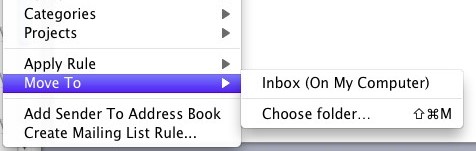
This message will no longer be using up part of your storage quota.
This process can be sped up by selecting multiple messages rather than a single message before moving it to your Local Folders
You may also want to archive emails from your Drafts and Sent folders as emails in these folders also count towards your mailbox usage.