Google Webmaster Tools Verification
If you want to learn more about Google Webmaster tools, take a look at the site by going to http://google.com/webmasters/tools/
1. Get your code
Before you can do anything with Google Webmaster Tools you must verify that you own the domain. To do this, Google asks you to add code to your site.
To get your code, you will need to do the following...
Add a site to your Google account, with the correct domain name
Select "Add meta tag" option
2. Login to your PagePlay site
If you don't know how to do this, see the following guide: https://pageplay.com/help/log-in
3. Go to the Google Webmaster Tools section of the PagePlay toolbar
When you're logged in, at the top of the site you will see the PagePlay toolbar. Click on the "Site" option, followed by "Google Webmaster Tools"
4. Enter your meta code and press "Confirm"
Your code looks something like the following..
<meta name="google-site-verification" content="vrZw_o9ga_Tm3cBExLsTAKSi0GKzMgvnzhSlBTXEnP8" />
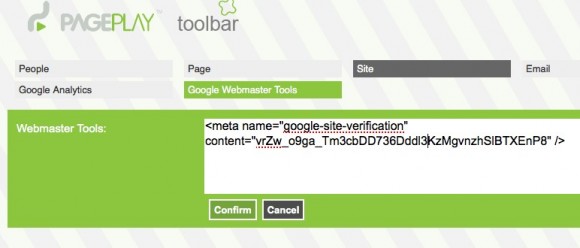
5. Verify your website with Google
Once you've clicked confirm, you can go back to Google Webmaster Tools and verify your website